

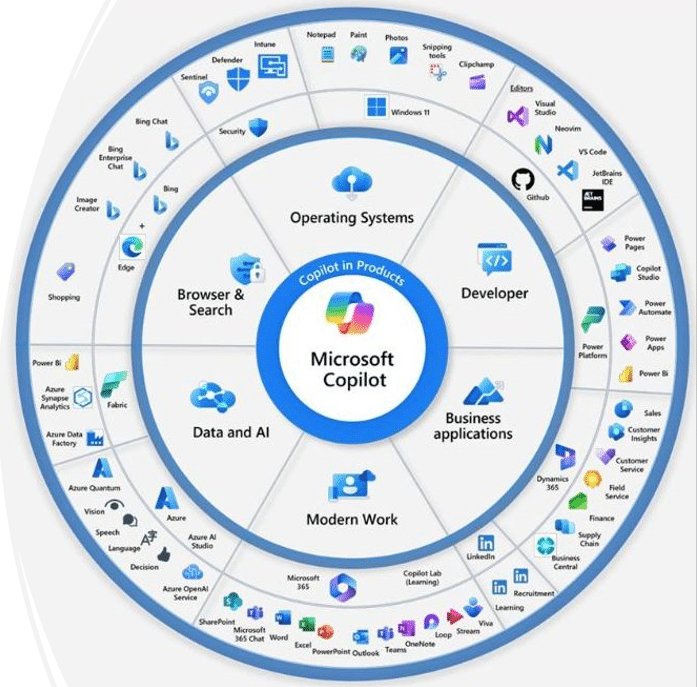
Microsoft has announced a significant expansion of its Copilot capabilities, integrating new artificial intelligence enhancements across its suite of products — from Windows and Microsoft 365 to Azure, Dynamics 365, and even GitHub. This strategic move underscores Microsoft’s ongoing commitment to making AI a natural and intelligent companion within its software ecosystem, supporting users in their daily workflows, creative projects, and technical development.
Bringing AI Deeper Into the Microsoft Ecosystem
Copilot has already become a familiar name in Microsoft’s product lineup, but the newest announcements take it even further. The company is focusing on tighter integration and more context‑aware intelligence across all platforms. Rather than simply acting as a chatbot or query assistant, the upgraded Copilot aims to work proactively — understanding user intent, summarizing key information, generating content, automating repetitive tasks, and even anticipating next steps based on activity patterns.
In Windows 11, Copilot is being positioned as a central hub for everyday assistance. Users can ask Copilot to adjust system settings, summarize documents, organize schedules, or fetch information from across Microsoft 365 apps. The assistant now appears natively on the desktop, ready to help manage both personal and professional activities, whether composing an email in Outlook, analyzing data in Excel, or brainstorming ideas in Word.
Smarter Collaboration in Microsoft 365
One of the major upgrades lies in Copilot’s deeper functionality within Microsoft 365 applications. In Word and PowerPoint, the new AI can refine writing tone, transform text into well‑structured drafts, and even generate full presentations from a short prompt. Excel benefits from improved data insights, where Copilot can interpret natural‑language queries — for example, “show me quarterly sales trends for the past year” — and instantly translate them into dynamic charts or pivot tables.
Teams and Outlook have also seen substantial improvements, especially in communication management. Copilot can now summarize long chat threads or email chains, extract action items, and even suggest draft responses that reflect a user’s typical writing style. These capabilities are designed to cut through the volume of workplace communication and allow users to focus on decision‑making rather than administrative overhead.
Developer Support Through GitHub and Azure
Microsoft’s developer community remains a central focus of the Copilot expansion. On GitHub, Copilot is getting smarter at understanding project context by referencing documentation, bug reports, and coding conventions automatically. Engineers can now use conversational prompts to generate code, improve debugging, or even create tests. Similarly, Azure’s AI Studio brings more customizable Copilot experiences to enterprise customers, allowing organizations to integrate domain‑specific knowledge and tailor how AI interacts with their proprietary systems.
This integration extends to Dynamics 365, where Copilot now supports sales and customer service professionals. By analyzing customer interactions and business data, Copilot can recommend next‑best actions, craft personalized responses, and surface relevant insights to improve overall customer engagement.
Enterprise and Security Enhancements
As Microsoft embeds Copilot deeper into workplace software, privacy and security remain top priorities. The upgraded AI operates within Microsoft’s trusted security and compliance frameworks, ensuring that corporate data is handled responsibly. Administrators can control access, set policies, and monitor interactions to keep AI‑generated output aligned with enterprise governance requirements.
Microsoft is also offering enhanced customization through Copilot Studio, a new feature that enables IT departments and developers to design bespoke Copilot experiences. These can be adapted to reflect company knowledge bases or adapted workflows, making Copilot not only a general digital assistant but also an enterprise‑specific productivity partner.
A Vision for the AI‑Powered Future
Satya Nadella, Microsoft’s CEO, has repeatedly stated that the company’s mission is to place “AI assistance at the center of every digital experience.” The expanded Copilot rollout clearly reflects that ambition. By weaving AI more deeply into productivity software, operating systems, and developer tools, Microsoft aims to redefine how people interact with technology — shifting from manual input to intelligent collaboration.
These developments signify a broader trend in the tech industry, where generative AI is becoming an everyday feature rather than an experimental tool. For Microsoft, Copilot is not just an add‑on; it is the core interface for the user’s digital environment across work and life.
With expanding capabilities, more natural interactions, and a commitment to security and integration, Microsoft’s enhanced Copilot features mark a step toward a future where AI fluently supports human creativity, productivity, and innovation.